A next step for every case.
Keep dated and undated tasks with their cases. Track what’s open, what’s due, and what’s done.
Estate planning, thoughtfully connected
From the first client detail to the next follow-up.
A calmer, more connected way to prepare estate packages.
A Mac and Windows desktop workspace for Texas estate planning practices · Early access
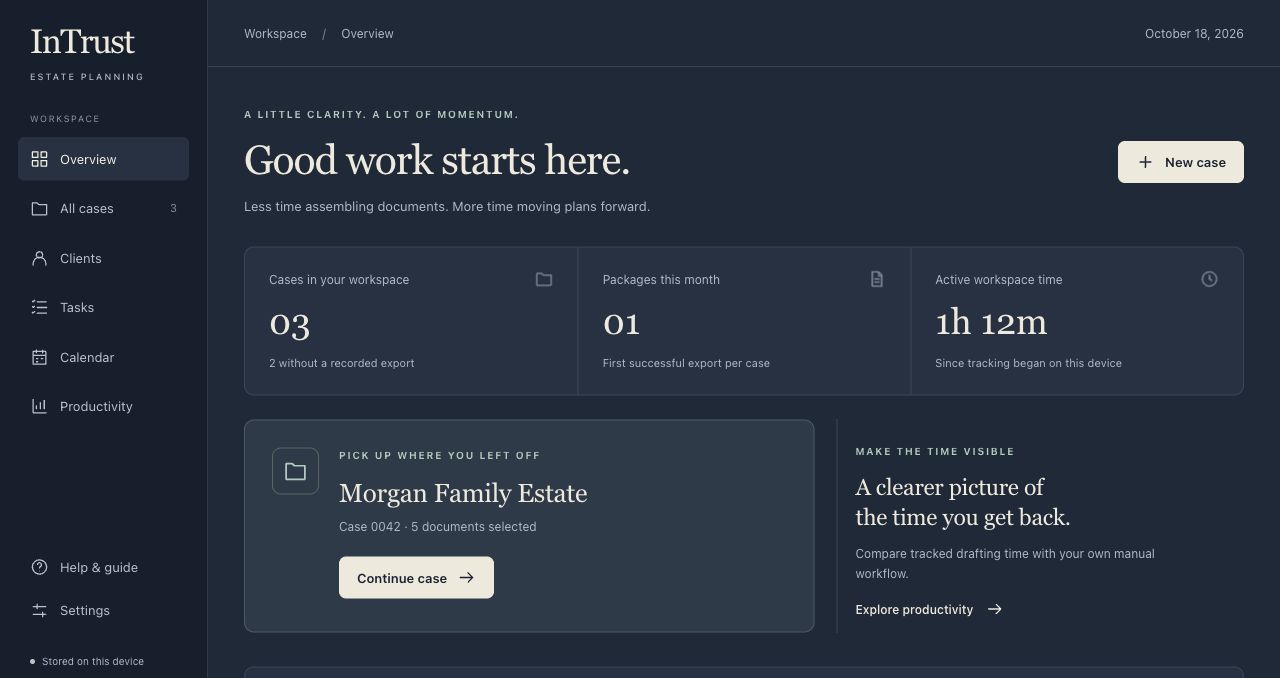
Actual workspace · Fictional sample data
Built for the work.
And the people behind it.
01 / From details to documents
Less copying, assembling, and keeping track.
InTrust brings structure to the preparation, so your attention can stay on the plan.
Open a case and work through structured fields for the client, fiduciaries, beneficiaries, and planning choices.
Illustrative workflow · You guide each step02 / The whole picture
Meet the workspace for everything around it.
See your cases, upcoming tasks, and recorded activity, then move straight into the next piece of work.
Actual workspace
Fictional sample data
Keep dated and undated tasks with their cases. Track what’s open, what’s due, and what’s done.
Start from a client email template, personalize it, and open a draft in your email app. You review and send.
Compare tracked workspace time with your own manual-drafting estimates. See the difference in your workflow.
Coming next / Intake with review
Your client information already has a starting point. We’re building a way to bring it into the case, with a person reviewing each proposed change.
Import from CSV, Excel, or a supported questionnaire JSON file. Choose a new or existing case, then check the proposed values before applying them.
Local PDF extraction is a development prototype, not part of regular installed releases. Will, Trust, and Provisions headings help organize review beside the original page. Information without a supported destination stays in source notes. Handwriting accuracy varies, and every proposed value needs review. Packaging and Windows testing are still in progress.
Encrypted workspace storage and password-protected backups are implemented in a test version. Mac and Windows recovery checks must pass before rollout. Exported Word files remain separate.
A way to check for new versions and install after saving is in preparation. Installer signing, distribution, and upgrade testing remain in progress; automatic updates are not enabled for general use.
These are previews of work in progress, not delivery dates. We’ll confirm the features in your installed version during a walkthrough.
03 / Room for what matters
A client conversation. A careful review.
A little breathing room in your day.
Explore the difference with your own estimates.
In the app, Productivity uses your recorded activity and the manual baselines you set.
of potential time back each month
Example inputs, not measured results or a performance promise. Actual time depends on your package and review process. Use the same scope of work for both estimates.
04 / Thoughtfully fitted
Start with the documents and drafting preferences your firm already knows. We’ll discuss the package, configuration, and support that fit your practice.
Let’s talk about your workflowPricing reflects your document set, template complexity, configuration, and implementation needs.
Cases and workspace records stay on the device. Light and dark modes make the workspace feel like yours.
An in-app guide is always within reach, from your first case to the next client follow-up.
A few useful details
The upcoming import workflow supports CSV, Excel, and supported questionnaire JSON files in the test version. You review proposed mappings and apply only approved values. PDF scans and handwriting are a separate development prototype, not available in regular installed releases yet. Explore the intake preview.
No. InTrust supports structured preparation and document assembly. Basic entry checks do not replace an attorney’s review of the documents and the client’s plan.
Create an event in InTrust, then open a Google Calendar or Outlook draft, or export an Apple Calendar-compatible calendar file. You save or import it in the external calendar. These are separate copies; changes do not sync automatically.
InTrust helps prepare an email draft that you review and send through your email app. Case fees record expected charges for internal planning; they are not invoicing, payment collection, or profit reporting.
The current workspace stores data locally on each device. It does not provide shared cloud case storage or automatic device synchronization. We can discuss your team’s setup during a walkthrough.
Request a walkthrough below. We’ll discuss your current estate package, drafting process, desktop requirements, and implementation scope before planning next steps.
Let’s move your practice forward
Tell us a little about your practice.
We’ll walk through InTrust together and see where it can make your work easier.